01
Stay ahead of caps
Used percent, remaining days, and an ETA at your current load sit on the desktop. No tab-hopping through ChatGPT or Cursor settings.
Windows · Codex · Cursor
Apibars is a compact always-on-top widget for Windows. It shows used %, time to reset, and burn-rate ETA for Codex and Cursor so you can pace spend instead of hitting a hard stop.
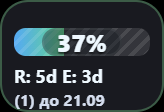
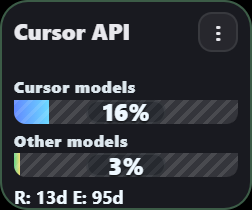 Live widgets · used %, reset, ETA
01
Used percent, remaining days, and an ETA at your current load sit on the desktop. No tab-hopping through ChatGPT or Cursor settings.
02
Watch both Cursor pools and Codex week usage. Slow down before you burn the rest of the cycle, not after the bar is empty.
03
Apibars reads local sessions on your PC. There is no cloud login, no telemetry account, and no way for us to open your Codex or Cursor.
04
Color thresholds, low-quota notifications, and reset pings. Set the percent that matters to you, then keep working.
One portable app. Enable the providers you already use. Widgets refresh on your machine.
Download the Windows exe. No installer. WebView2 is already on current Windows 10/11. Pin it always-on-top or hide it to the tray.
Today those two are live. Enable a provider in settings. Apibars uses the session already on this computer.
Each widget shows used %, time until the window refills, and how long the remaining quota lasts at the current burn rate.
Privacy
Apibars does not ask you for a password and does not create an Apibars cloud account. Codex usage is read from the local Codex auth already on the machine. Cursor usage is read from the local Cursor session on this PC. Those credentials are not uploaded to apibars.com. We cannot sign in as you, browse your chats, or spend on your behalf.
The widget is quiet until you want a signal. Thresholds are yours.
Same product, two quota models. More providers can follow; these are the ones that ship now.
Codex
The Codex widget shows how much of the week window is already used, not how much is left. R is time until that window resets. E is the ETA: how long remaining quota lasts if you keep the current load. If ChatGPT granted extra unplanned reset credits, Apibars shows the count and the date they expire.
Cursor
Cursor models and Other models are separate bars, because they are separate quotas. One shared reset date sits under both. The ETA uses the monthly window so you can see whether current API or Auto usage will last until billing resets, or run out first.
No. Apibars never receives your password, and we do not operate a cloud login. The app reads the session that already exists locally. If you never run the app, we have nothing.
Watch used % plus ETA. If ETA is shorter than the reset, you are burning faster than the cycle. Ease off, switch models, or wait for reset. Color alerts and low-quota notifications fire before the bar hits 100%.
R is remaining time until the quota window resets. E is estimated time until remaining quota is consumed at the current usage rate.
Windows 10/11, portable exe. Codex and Cursor are the live providers. Other tools are not marketed as ready yet.
The current download is a free portable build. No account is required to run the widgets.
SHA-256 4AA134FE3833B7240C806838D0344C3596893A867404E26C8B588FC5682579CB